
Slot IQ Flow: the Staff Dashboard that closes the loop
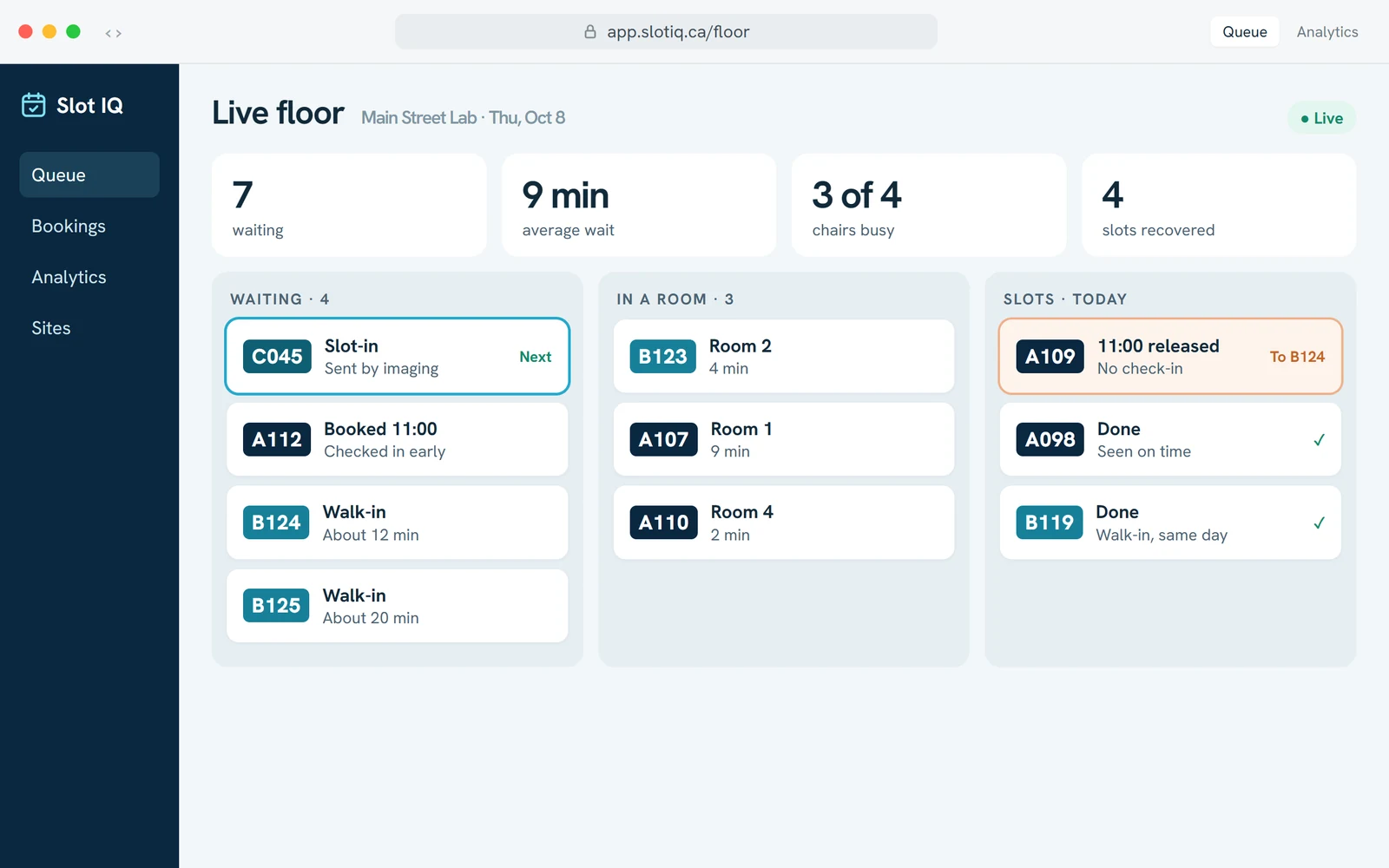
A staff dashboard and check-out station is the live view where front-desk and clinic staff see who is waiting, who is next and why, which chairs are free and which slots have been recovered. Slot IQ Flow runs on one fixed queue rule, so staff learn it in an afternoon and can explain every call to a patient in one sentence.
Part of Slot IQ, a TSB Healthcare product.
Run the day from one screen
See who is waiting
One live view: who is waiting, which chairs are free, which slots were recovered.
Call next, with a reason
One fixed queue rule, so every call can be explained to a patient in one sentence.
Close out the visit
Arrival, call and completion are each one tap, so every wait is recorded as it happens.
One live view of the day
Staff run the day from one live view: who is waiting, who is next and why, which chairs are free, which slots have been recovered.
- Learn it in an afternoon: the dashboard shows one thing, who is next and why.
- One fixed queue rule: staff can explain every call to a patient in one sentence.
- One code per patient: A for booked, B for walk-in, C for department slot-in, on the dashboard, the display and in text updates.
Recorded as it happens, not reconstructed at month end
Most wait-time reporting is an estimate assembled weeks later from whatever people remembered to write down. When arrival, call and completion are each a tap someone was going to make anyway, the timings are simply a by-product of the shift.
Real wait, per patient
Time from check-in to called, and called to completed, for every visit: which is what an actual wait time is, as opposed to what the schedule said should have happened.
Feeds the analytics directly
Every state change is an event the flow analytics read. No separate audit exercise, no one keying a tally sheet into a spreadsheet on Friday.
Attributable, by design
Actions are logged with who took them and what changed, before and after. That is an audit requirement for health regions: and the fastest way to answer “what actually happened with this patient?”
Everything the kiosk hands back to a person
Self-service handles the routine arrivals. The station is for the patients and situations that genuinely need someone: which is the trade the whole system is built to make.
Register the walk-in
Create a same-day visit for someone who arrived without a booking, or who could not manage the kiosk, and drop them into the same fair queue with a ticket number.
Find any patient fast
Search by name, email, phone or booking reference: including the family member who booked on someone else’s behalf.
Fix the appointment
Reschedule, cancel or swap a slot at the counter, in the same system the patient booked in: not a second calendar that drifts out of step.
Only what the role allows
Receptionist, lab technician, call centre and administrator each see the actions their job needs and nothing beyond it, per site and per organization.
What it gives the front desk back
What does the Slot IQ Flow staff dashboard show?
The Slot IQ Flow staff dashboard shows who is waiting, who is next and why, which chairs are free and which slots have been recovered.
| Fact | Detail | Source |
|---|---|---|
| Main view | Who is waiting, who is next and why, free chairs, recovered slots | Slot IQ product brochure, September 2026 |
| Time to learn | An afternoon | Slot IQ product brochure, September 2026 |
| Queue rule | One fixed rule, so every call can be explained to a patient in one sentence | Slot IQ product brochure, September 2026 |
| Patient codes | A for booked, B for walk-in, C for department slot-in | Slot IQ product brochure, September 2026 |
FAQs
What is the staff check-out station?
How is it different from the check-in kiosk?
What hardware does it run on?
Can two staff work the same queue at once?
Is every action recorded?
Does it work across multiple outpatient sites?
Keep exploring
Last updated: October 2, 2026
See a shift run on it
We’ll walk a full visit through the kiosk, the staff station and the wall display: in a setting like yours, in about 30 minutes.





 and more…